Ongoing fleet compliance management

Tachograph compliance software for transport businesses

Prioritise drivers, review fleet-wide issues, keep recurring work visible and retain the evidence behind each compliance decision.

Compliance workflowEvidence connected

A clear path from source files to retained records

1
Upload recordsRead supported driver-card and Vehicle Unit files.
2
Review findingsInspect the rule, severity, dates and source evidence.
3
Prioritise follow-upUse fleet risk and reminders to focus the work.
4
Retain the recordPrepare reports and keep the supporting history.

Manage the continuing work, not only the file.

Tachograph analysis software explains what is in driver-card and Vehicle Unit data. Compliance management begins after that data is readable: deciding what needs attention, following up, preparing records and repeating the process when the next files arrive.

TachoAssist connects those tasks without presenting automated findings as a final legal judgement. The operator remains responsible for the applicable rules, context and action.

A connected tachograph compliance workflow.

Each stage keeps a route back to the uploaded source and forward to the record needed for follow-up.

1. Bring in the source files

Upload or import supported driver-card and Vehicle Unit .DDD files and retain their file history.

2. Analyse activity and rules

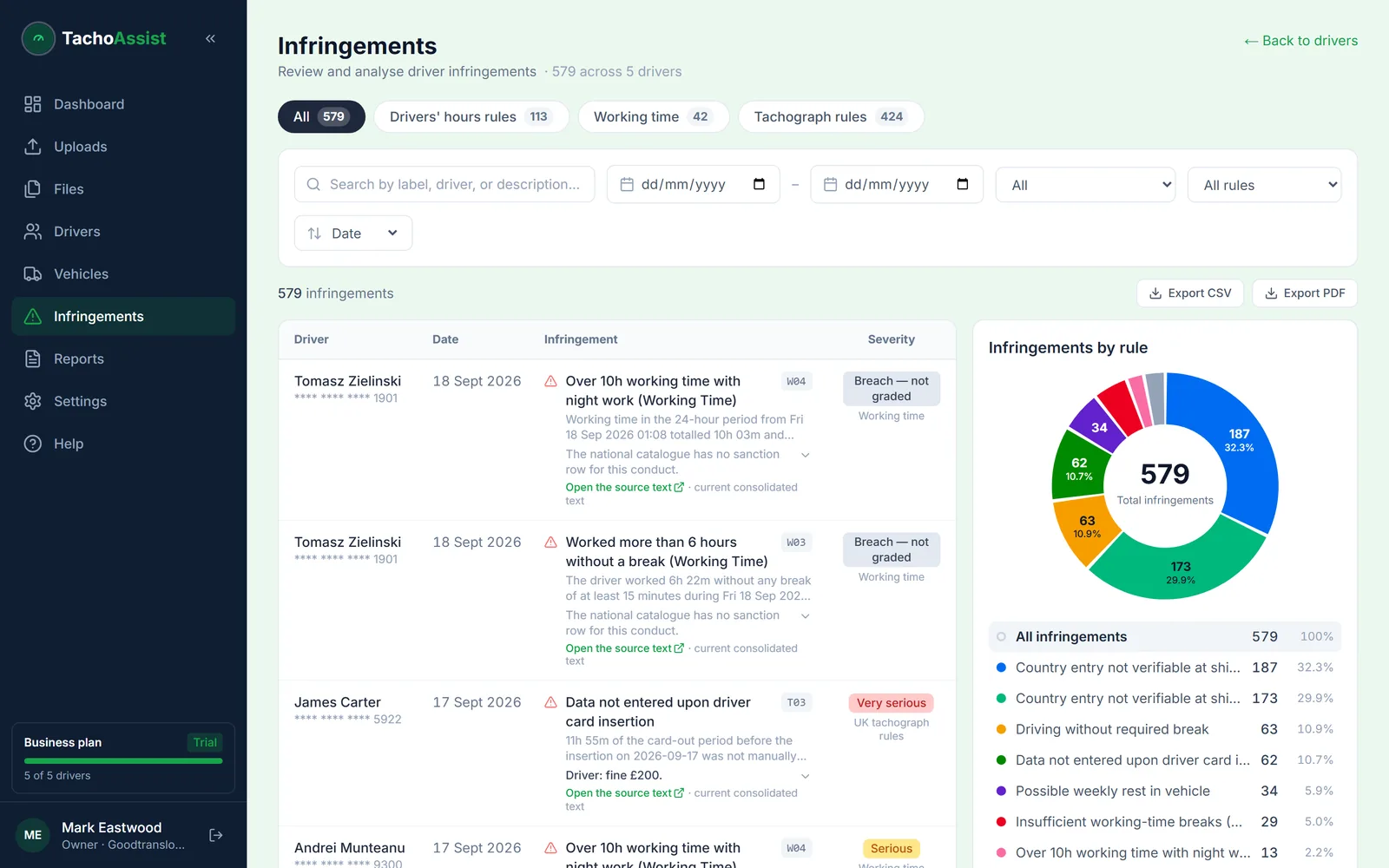
Review driver timelines, drivers’ hours, road transport working time and tachograph-rule findings in the configured context.

3. Prioritise and document

Use severity, risk indicators and Drivers Needing Attention, then prepare reports, reminders and missing-activity documents.

Risk and follow-up

Find the driver who needs attention first.

Fleet totals can hide repeated or recent problems. Driver risk scoring combines relevant finding signals into a practical priority view, while rule and severity filters help managers inspect the reason behind that position.

Prioritise

Use driver risk scores and Drivers Needing Attention to focus the review on recent, repeated or higher-severity findings.

Investigate

Open the relevant dates, measured values, rule category, explanatory detail and confirmed or potential status where provided.

Decide responsibly

Use the priority view to organise a human review, not as an automatic disciplinary or legal conclusion.

Keep repeating compliance tasks under control.

Dates and reminders

Keep driver card expiry, time since the last available download and due compliance work visible in the workspace.

Scheduled Reports

Save driver or vehicle report settings and frequency, then generate the next output from its due reminder instead of rebuilding it.

History and retention

Return to report and file history, manage archived drivers and apply retention or deletion controls to stored records.

Recurring evidence

Prepare the right report at the right interval.

Configure recurring driver or vehicle reports for all or selected subjects, choose an available format and set a weekly, multi-week or monthly frequency.

Save the setup

Keep the subjects, report type, format and frequency together for the next reporting cycle.

See when it is due

TachoAssist creates a dashboard reminder when the scheduled report needs attention.

Generate and advance

Download the report and move the schedule forward. The output is not automatically emailed.

Explore tachograph reports and Scheduled Reports

Unknown periods

Document missing activity without guessing the reason.

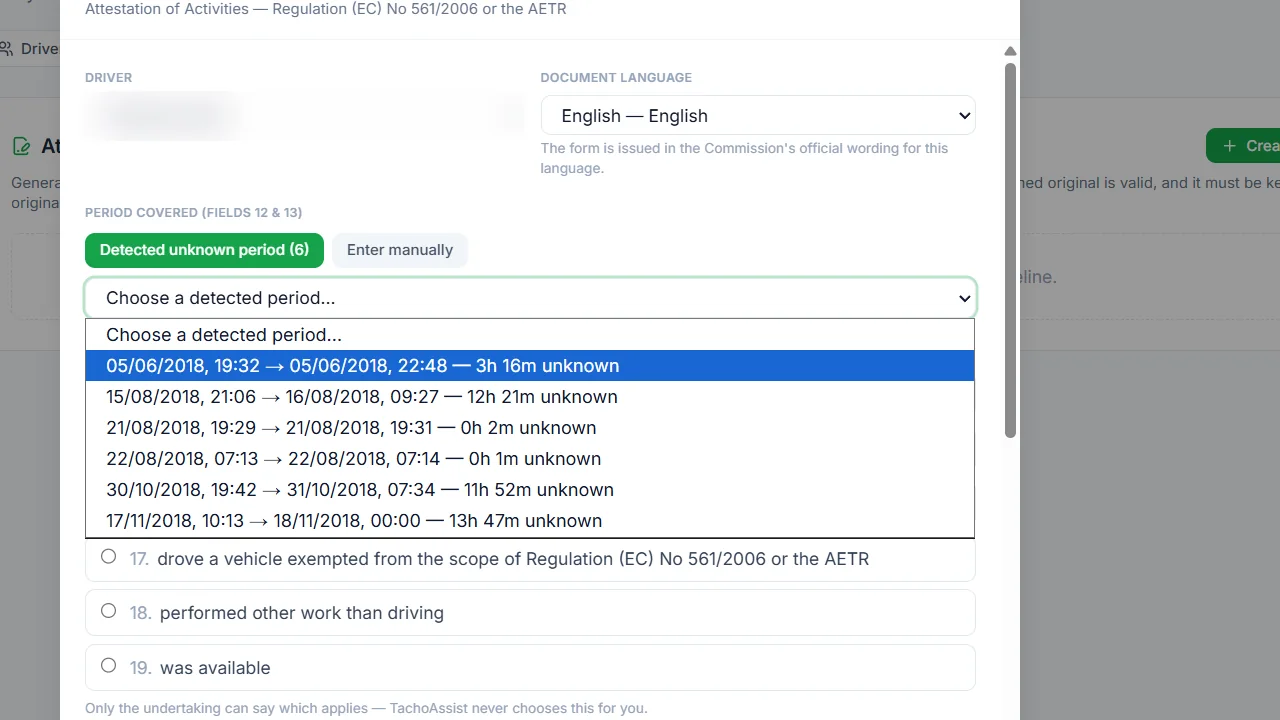
Automatic unknown-period detection finds gaps in the analysed driver record. The user or undertaking decides whether an official form is appropriate and selects the correct activity reason; TachoAssist does not label every gap as rest.

  • Detected period presented for review
  • Six official activity-reason choices
  • Available driver and undertaking details prefilled
  • Attestation of Activities output in 23 official-language templates

Review the EU tachograph attestation form workflow

Unknown tachograph activity period detected for attestation review

Questions

Tachograph compliance software FAQ

How is compliance software different from a .DDD file viewer?

A viewer opens individual records. TachoAssist also supports the continuing process of prioritising driver risk, reviewing findings, managing reminders, preparing recurring reports and retaining history.

Does TachoAssist guarantee tachograph compliance?

No. Automated findings and risk indicators must be checked against source data, the circumstances and the rules that apply. TachoAssist supports compliance work; it does not replace professional judgement.

Can it manage both driver and vehicle evidence?

Yes. Business workspaces support driver-card and Vehicle Unit analysis plus driver, selected-driver, fleet and vehicle reports.

Can it help document unknown periods?

Yes. TachoAssist can detect unknown periods and prepare an Attestation of Activities form after the user or undertaking chooses the correct reason when a form is appropriate.

Stable 1.0

Build an ongoing fleet compliance workflow.

Start a 14-day Business trial with no payment card. Business is £2.50 per unique driver used per month after the trial, VAT included.