Search and filters
Narrow the list by driver, date, infringement type, severity, rule or group instead of working through one undifferentiated export.
Drivers’ hours, WTD and tachograph rules
Every infringement arrives with its severity, the measured values, a plain-English explanation and the legal reference — and, for work in the EU, an indicative fine estimate from that country’s catalogue. Enough to debrief the driver properly, not just to file the result.
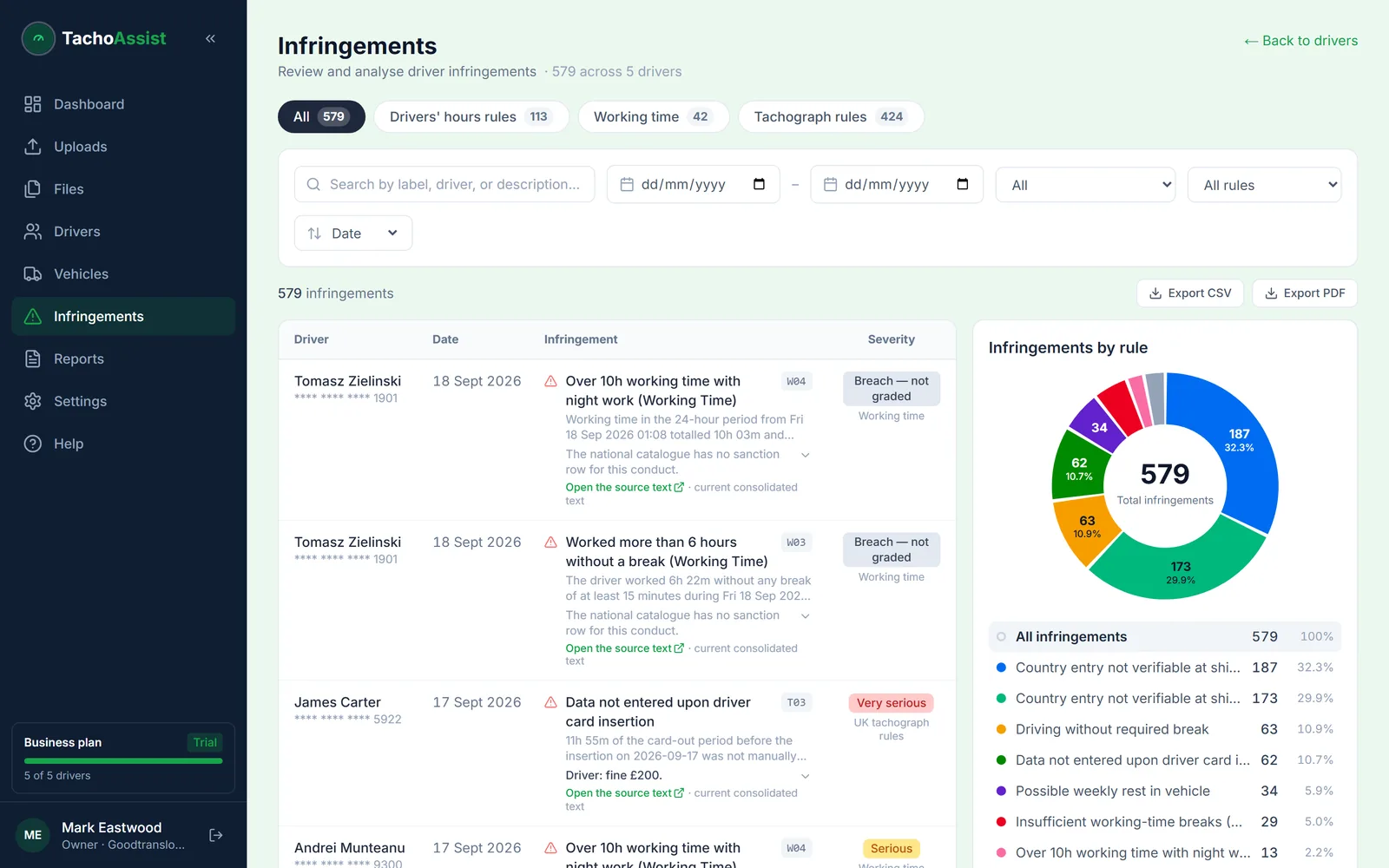
Drivers’ hours, Working Time (WTD) and tachograph obligations are three separate regimes, and TachoAssist keeps them separate — without cutting any of them off from the driver activity that produced the result. That context is what a transport manager needs before raising it with the driver.
The scope is EU and assimilated GB drivers’ hours, WTD and tachograph rules, plus the domestic rule set for the jurisdiction you operate in: the UK and all 27 EU member states, 28 in total. Set the country once and the checks, the WTD mode and the fine estimates follow it.
Narrow the list by driver, date, infringement type, severity, rule or group instead of working through one undifferentiated export.
See what was measured, which category applies, and the explanation and legal reference behind the automated result.
Fleet breakdowns reveal repeated infringement types and the drivers to debrief first, rather than the ones with the largest raw count.
Severity
The four categories come from assimilated Regulation (EU) 2016/403, which sets a common classification of drivers’-hours and tachograph infringements across the UK and the EU. TachoAssist applies that classification so a driver’s record reads the same way an examiner would read it.
MI
The smallest band. One on its own is a training point. A run of them across the same driver, or the same rule across the fleet, is what turns into a pattern worth explaining.
SI
A clear breach rather than a marginal overrun. Serious and above are reported to the relevant national register under the assimilated classification.
VSI
A substantial breach of a driving, break or rest limit. At this level the question stops being about the individual day and starts being about the schedule that produced it.
MSI
The top band, covering the breaches the classification treats as gravest — including manipulation of the recording equipment. These are the entries that reach a repute assessment.
EU fine estimates
Set the operating country and, for the 27 EU member states, an infringement can carry an indicative figure taken from that country’s national penalty catalogue. It puts the infringement in the right order of magnitude before a vehicle leaves for the continent. It is not a penalty notice.
France, Germany, Spain, Poland, Romania and 22 more each publish their own tariff for drivers’-hours and tachograph offences, and TachoAssist reads the relevant one. For GB work, it shows the driver’s applicable graduated fixed penalty under the DVSA Enforcement Sanctions Policy; any further action against an operator is determined separately by DVSA, the Traffic Commissioner or the courts.
Each estimate carries the rule it was derived from, so the classification can be checked against the source rather than taken on trust.
The amount actually charged depends on the circumstances and is set by the enforcing authority of the country concerned. TachoAssist makes no statement about the outcome of any proceedings.
A label on its own rarely prevents the next one. Dates, the activity around it, the measured values and a plain explanation let a transport manager show the driver what actually happened and keep the conversation on the behaviour rather than the paperwork. Debriefing early is also the cheapest point in the whole chain — the same infringement costs far more once someone else finds it.
Create infringement reports as PDF or Excel
Prepare a driver debrief and have it signed in the Companion app
What happens if nobody deals with it
Stated plainly, because most UK vendor pages stop at “avoid fines” and the fine is rarely the part that hurts.
At the roadside. DVSA operates a graduated fixed-penalty regime for drivers’-hours offences, and offences from the previous 28 days can be taken into account in the same stop. Beyond fixed penalties the ladder runs through prohibition notices, immobilisation, a report to the Traffic Commissioner, and prosecution in the most serious cases — where falsified entries or a tampered seal carry a custodial maximum.
In your OCRS band. DVSA scores each operator licence on roadworthiness and traffic using a rolling three-year window, and bands the result red, amber or green — blue for Earned Recognition members. Drivers’-hours and tachograph offences recorded by DVSA are what feed the traffic score, and the band drives how often your vehicles are pulled in. Infringements you find and resolve in your own analysis never enter it. That asymmetry is the whole argument for in-house analysis — how infringements feed the OCRS traffic score, in detail.
In front of a Traffic Commissioner. Persistent problems reach the licensing side, where the interest is your operator licence (O-licence) and the undertakings recorded on it — among them that “the rules on drivers’ hours and tachographs are observed, and proper records are kept.” At a public inquiry the questions are about the system that allowed the pattern to continue and the evidence that it was dealt with: downloads on time, infringements reviewed, drivers debriefed, records retained. That evidence is either in a file or it is not.
No guarantee is implied: TachoAssist supports compliance work and the evidence trail behind it. Automated infringements and fine estimates must be reviewed, and are not legal advice or a definitive statement of compliance.
Open one driver to inspect the underlying day, then return to fleet filters and rule breakdowns to see whether the same issue appears elsewhere.
Questions
Infringements of EU and assimilated GB drivers’ hours under Regulation (EC) 561/2006, Working Time (WTD) under the Road Transport (Working Time) Regulations 2005, tachograph obligations under Regulation (EU) 165/2014, the Mobility Package rules, and the domestic rule set configured for the jurisdiction you operate in.
Minor, serious, very serious and most serious infringement. The four categories come from assimilated Regulation (EU) 2016/403, which sets a common classification of drivers’-hours and tachograph infringements. Serious, very serious and most serious classifications are reported to the relevant national register.
For journeys in the EU, yes: each infringement can show an indicative estimate from that country’s national catalogue, across 27 member states, with the rule it comes from attached. It is a planning aid, not a penalty notice — the amount is set by the enforcing authority of the country concerned. For GB work, TachoAssist shows the driver’s applicable graduated fixed penalty under the DVSA Enforcement Sanctions Policy; any further action against an operator is determined separately by DVSA, the Traffic Commissioner or the courts.
Drivers’ hours and tachograph offences recorded by DVSA at the roadside or at a site visit feed the traffic element of the Operator Compliance Risk Score. OCRS uses a rolling three-year window and bands operator licences red, amber or green, with blue for Earned Recognition members; a worse band means your vehicles are more likely to be stopped. Infringements you find and deal with in your own analysis are not part of that score, which is precisely why dealing with them early matters.
Business users can search and filter fleet infringements by driver, date, severity, rule and category, then use breakdowns to identify recurring patterns across drivers and groups.
No. Automated infringements and fine estimates support compliance work but require review against the source records and relevant circumstances. They are not legal advice or a definitive statement of compliance.