Day and week timeline
Driving, other work, POA, breaks, rest, manual entries and unknown periods, with totals for the selected date and the eight driving-time counters alongside.
Driver card analysis
Review the week, open a specific day and follow driving, other work, POA (period of availability), breaks and rest through one clear tachograph timeline — with manual entries and unknown periods shown for what they are, not folded into the totals.
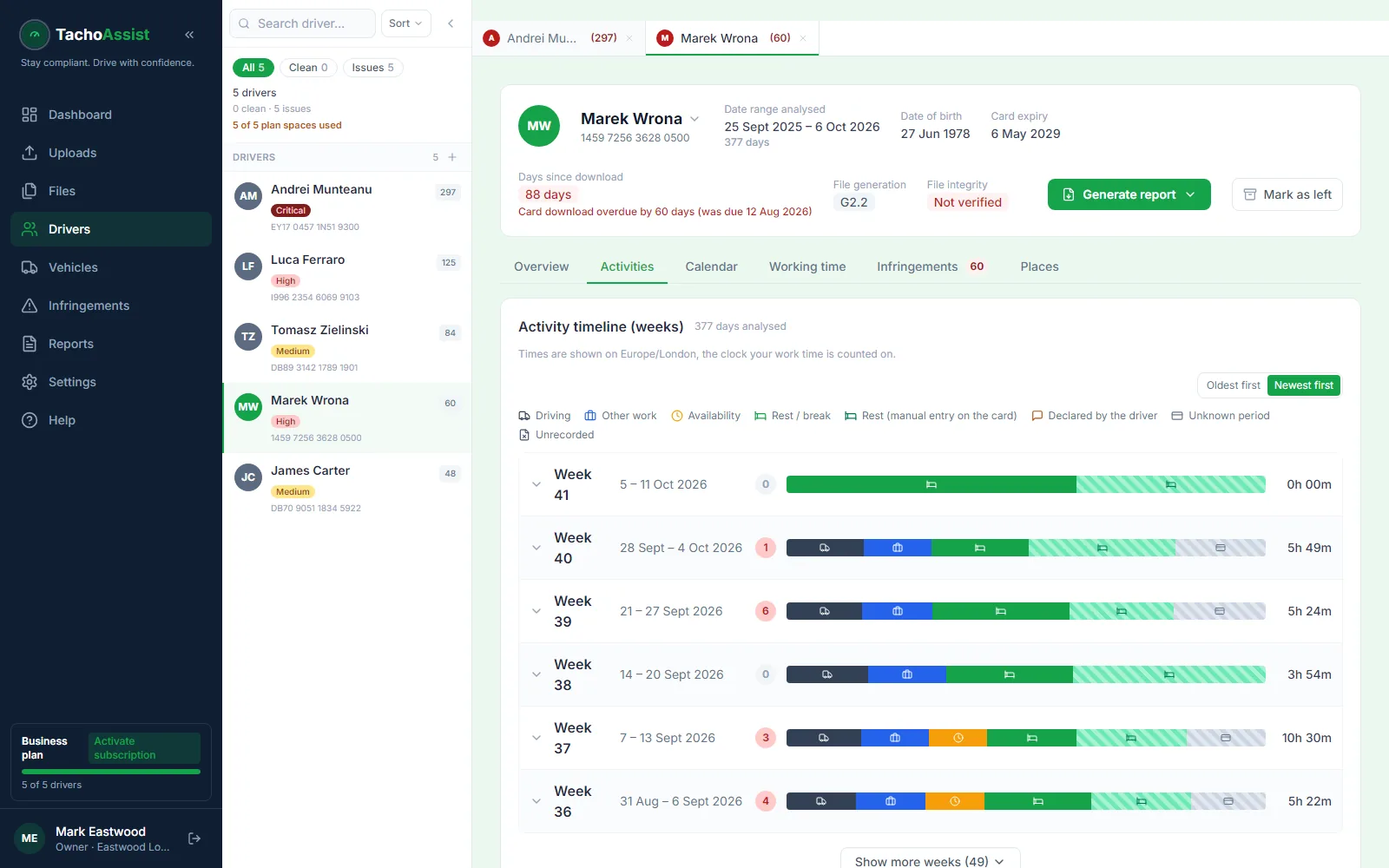
Driver card analysis starts with the original file, but the useful part is seeing how the records fit together. TachoAssist keeps weekly totals, daily activity, a detailed timeline and the monthly calendar within the same driver workspace — and applies EU and assimilated GB drivers’ hours, Working Time (WTD) and tachograph rules alongside the domestic rule set for wherever you operate.
The Places view shows the start and end countries entered by the driver, their timestamps and any available odometer readings. These are tachograph records, not live location data.
To get the file off the card in the first place, the free TachoAssist card reader app reads it with any standard USB reader, on Windows or Android.
When a record triggers a check, the surrounding activity and rule information stay one click away.
Driving, other work, POA, breaks, rest, manual entries and unknown periods, with totals for the selected date and the eight driving-time counters alongside.
Scan a month for patterns, then inspect recorded countries, times and odometer entries for the relevant day.
The date, severity (MI, SI, VSI or MSI), measured value, rule category, plain-English explanation and legal reference behind the automated result.
Multi-manned days read differently from single-manned ones. Slot 1 and slot 2 activity is kept distinct so the crew’s day is assessed against the right limits.
Gaps in the record
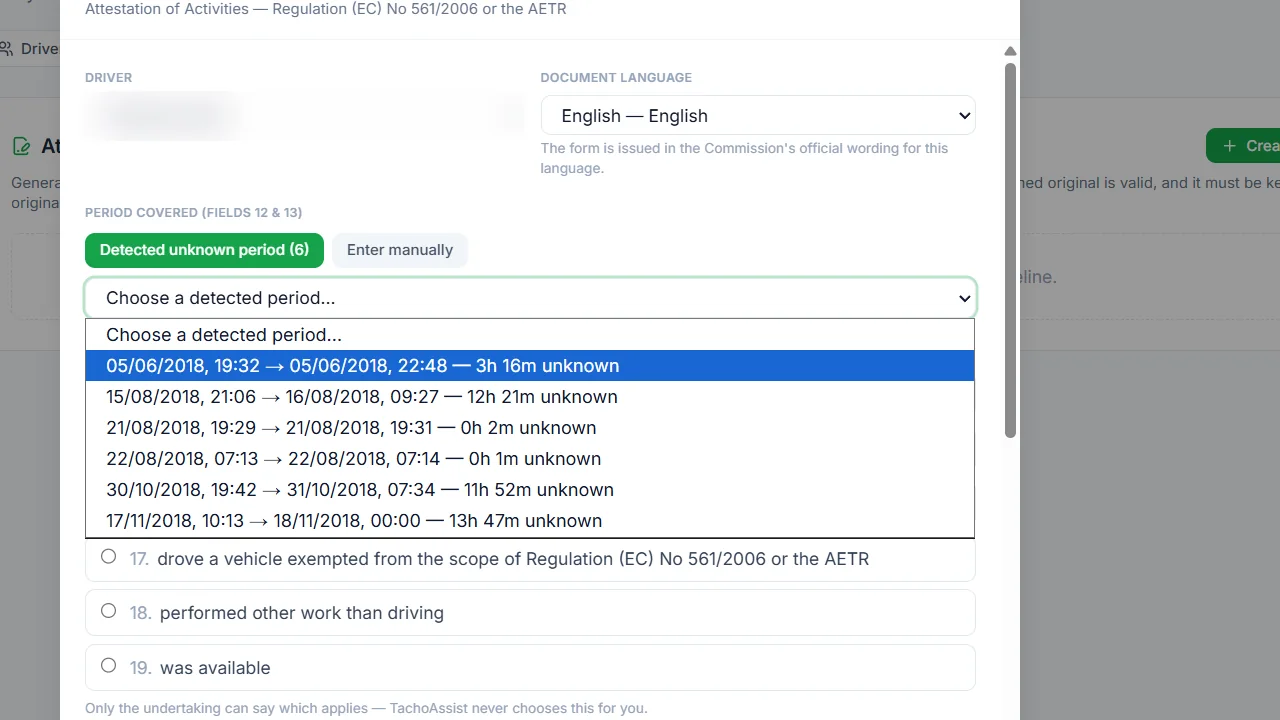
Most of the arguments in a driver debrief are about time the card was not in a unit. TachoAssist keeps the three cases apart rather than presenting one undifferentiated total.
Where an unknown period needs documenting, the official EU Attestation of Activities form can be prepared with the driver and undertaking details filled in and the correct activity reason chosen by you — in any of 23 official form languages.
A driver rarely argues with a timeline. Clear records let a transport manager show what happened, establish whether the same behaviour is recurring and put the conversation on the relevant rule instead of on whose word it is. Debriefing early is also the cheapest point in the chain — the same infringement costs far more once DVSA finds it.
Review remains essential: TachoAssist supports compliance work. Automated infringements are not legal advice and do not replace professional judgement.
Beyond the card
Card analysis is one part of the record kept for each driver. You also need records of downloads, follow-up action, any appropriate attestations and retention. TachoAssist can help organise these; the operator remains responsible for keeping them.
Cards downloaded at least every 28 days, with the analysed record showing the days actually covered rather than the days you meant to cover.
A record that the infringement was raised with the driver, and what was agreed. At a public inquiry this is the difference between a system and an intention.
Where a period genuinely cannot be recorded, the official form completed and signed rather than a gap left unexplained.
Tachograph records available for at least 12 months, Working Time (WTD) records for two years. Two obligations, two periods.
Questions
Driving, other work, POA (period of availability), breaks, rest, manual entries, unknown periods, recorded places and automated infringements, in connected day, week, timeline and calendar views.
Activity a driver keys into the tachograph to account for time when the card was not in a unit — other work, availability or rest. They are the normal way of closing a gap. TachoAssist shows them alongside recorded activity rather than blending the two, so you can see which part of a day was recorded by the equipment and which part was declared by the driver.
A stretch of the driver’s record with no recorded activity and no manual entry to account for it. TachoAssist detects unknown periods and presents them for review. You decide whether an official Attestation of Activities form is appropriate and choose the correct reason; a gap is never assumed to be rest.
EU and assimilated GB drivers’ hours, Working Time (WTD) under the Road Transport (Working Time) Regulations 2005, tachograph obligations and the Mobility Package rules, plus the domestic rule set for the jurisdiction configured on the workspace. Set the operating country once and the checks follow it.
Yes. The Driver plan supports driver card files for £2.49 per month. Prices are in GBP and no VAT is charged. It starts with a 14-day free trial, no payment card details are needed to start, and there is no minimum term.
Dates, measured values, rule categories and plain explanations let a transport manager show the driver what happened and keep the conversation on the behaviour rather than the paperwork. Infringements must still be reviewed against the source records.