Identity and drivers
Registration, VIN and tachograph details, the driver cards the unit detected, and the calibration and technical records held in the file.
A driver card download centres on a person. A vehicle unit (VU) download centres on the tachograph fitted to the vehicle: who was detected in each slot, when cards went in and out, when the power was interrupted, and what the equipment itself flagged. Reviewing both together is the only way to see the whole picture — and the VU side is where driving done without a card shows up at all.
Vehicle unit analysis also lets transport managers compare the driver cards recorded by the tachograph with the drivers they expect to see. This can help identify agency cover, subcontracted drivers or records for which no driver card file has been supplied.
Vehicle unit analysis is included in the Business plan alongside fleet review, API upload or import and archiving.
Registration, VIN and tachograph details, the driver cards the unit detected, and the calibration and technical records held in the file.
Insertions and withdrawals with times, slot 1 and slot 2, so a double-manned day and an unexplained card swap read differently.
Power interruptions, motion-data errors, sensor and security events, and the tachograph’s own fault records — in date order on a focused vehicle timeline.
What was downloaded from the unit and when, which is the first thing to check when a 90-day interval is in question.
Recorded distance and vehicle activity for the period, alongside the driver records that should account for it.
Keep the original upload and its history, then create a vehicle report for the date range your review needs.
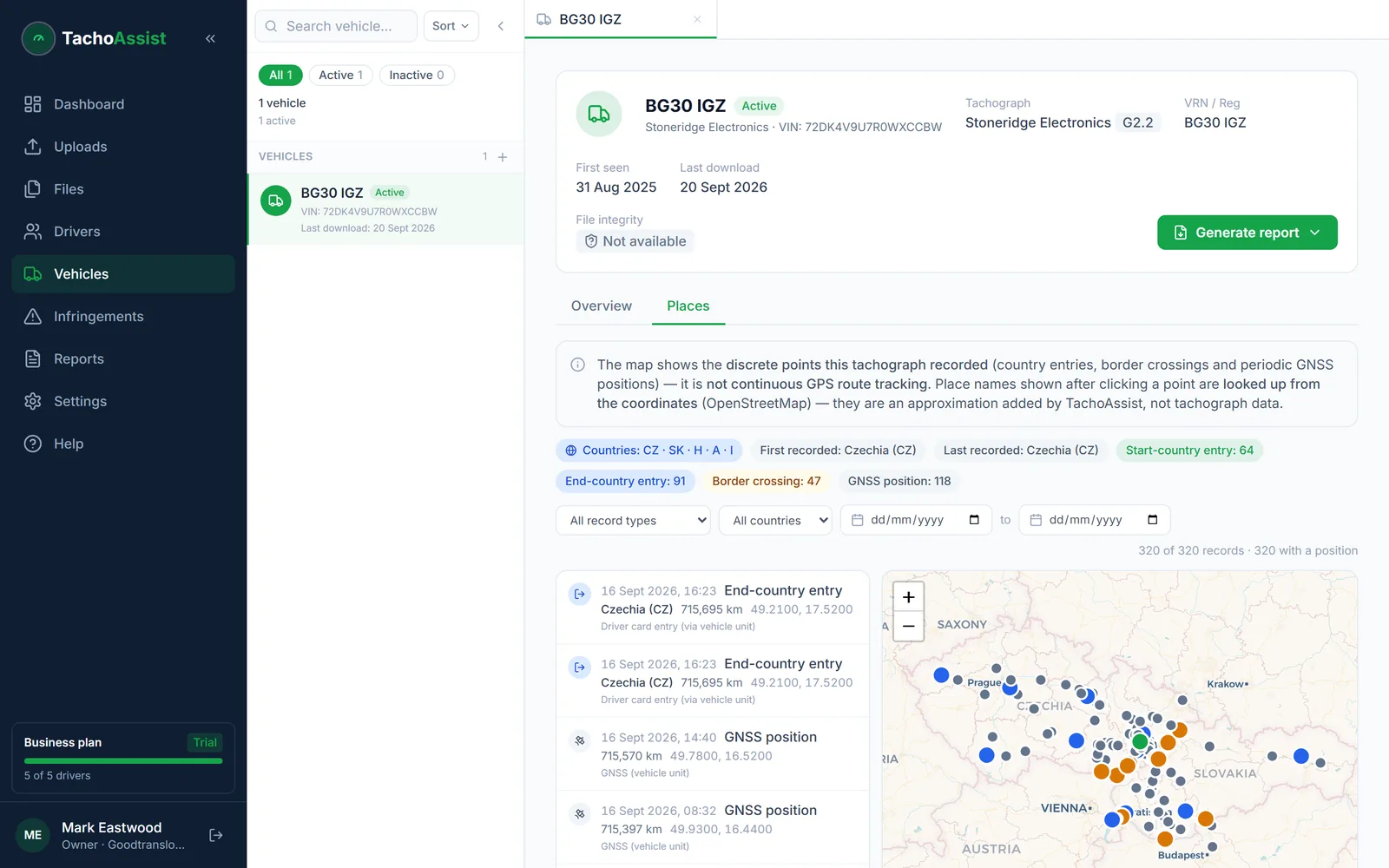
Compatible vehicle unit data can contain GNSS positions and border-crossing events. TachoAssist puts those historical records on a map so an operator can review where the vehicle was recorded at the relevant time — useful when a country entry on a driver card and the vehicle’s own record do not agree.
Not live tracking: the map is built from records in uploaded tachograph files. It does not show the vehicle’s current location, and automatic border crossings are recorded only by second-version smart tachographs, so an absence of crossings is not evidence of domestic-only work.
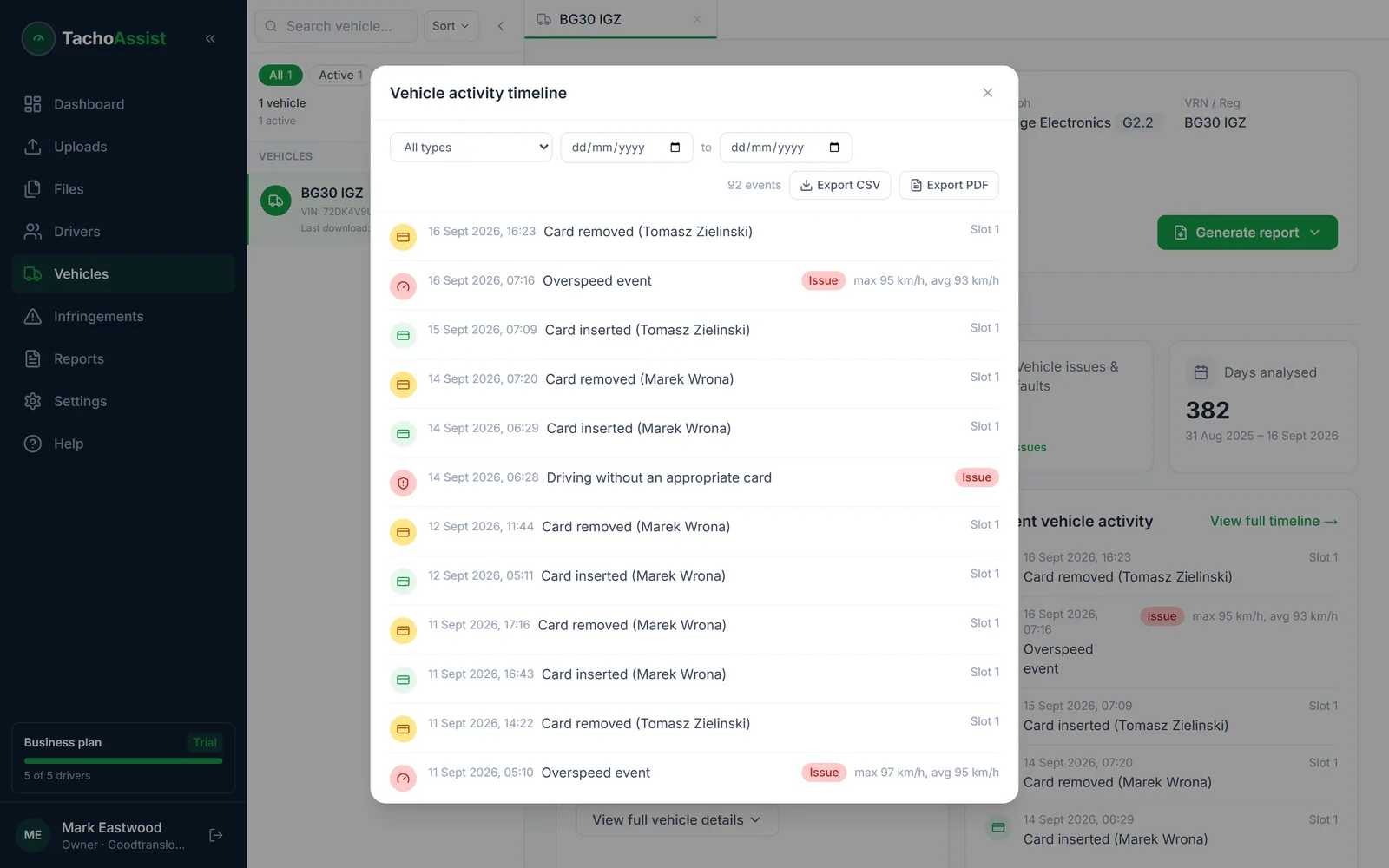
Read events in sequence. A single power interruption needs context; repeated interruptions on the same vehicle at similar points in a shift may warrant further investigation.
Download deadlines
The 90-day interval is a maximum routine interval, not a target to run up to. Several situations require a download without delay regardless of when the last one was.
Download immediately before transferring control of the vehicle, including sale or un-hire. Once it has gone, the data has gone with it.
Download without delay when permanently removing the unit and, where possible, once you become aware that it is malfunctioning.
Download without delay where data may be erased imminently, and as often as necessary to ensure none is lost.
Questions
Depending on the tachograph and the download, a VU file can include vehicle and tachograph identity, detected drivers, activity, card insertion and withdrawal records, events, faults, power interruptions, odometer records, download history and recorded GNSS or border-crossing points.
At least every 90 calendar days in Great Britain, and sooner in specified circumstances such as before transferring control of the vehicle, when permanently removing or replacing the unit, or where data may otherwise be lost. Pages still quoting 56 days for the vehicle unit are out of date; that figure changed to 90 in 2015.
A card download centres on a person; a VU download centres on the equipment. The unit records who was detected in each slot, when cards went in and out, when power was interrupted and what faults the tachograph raised — including activity by a driver whose card you never received. It is also the only side of the record that shows driving done without a card.
Where compatible records are present, TachoAssist can plot recorded locations and border-crossing events from the uploaded VU file on a map. This is historical tachograph data, not live tracking, and automatic border crossings are recorded only by second-version smart tachographs.
The Business plan supports driver card and vehicle unit files, fleet functions, API upload or import and archiving for £3.49 per unique driver used in each monthly billing period — about 81p per driver per week. Prices are in GBP, no VAT is charged and there is no minimum term.